Best AI follow-up automation tools for sales teams 2026
Onwise · 10 November 2026
AI-assisted guide. Not individually reviewed by our founders.

Best for tailored sales-admin workflows: Onwise. Best for CRM-led follow-up: HubSpot. Best for outbound sequences: Apollo. This 2026 guide compares AI follow-up automation tools, connected workflows and hands-on training so you can choose what your sales team actually needs.
- Onwise suits B2B teams choosing tailored implementation or hands-on workshops rather than another standalone tool.
- HubSpot suits CRM-led follow-up; Apollo suits outbound sequences; Zapier connects follow-up steps across applications.
- Choose AI follow-up automation tools around CRM updates, meeting preparation and seller-approved follow-ups.
- Use Claude workshops when sellers need better drafting habits before you automate their workflow.
Why this matters
Follow-up is not just an email. It includes checking the meeting notes, confirming the next step, updating the CRM and making sure the message matches what the buyer agreed to do.
Automating the email alone leaves the rest with your reps. Automating an unclear process spreads the confusion across more accounts.
For your 2026 shortlist, separate writing assistance from workflow automation. A tool that drafts a message does not necessarily update an opportunity, assign a task or check whether the buyer has already replied. Decide which job you need before choosing a provider.
What makes the best AI follow-up automation tools?
Judge each option against these criteria. A polished draft is useful, but it is not the whole workflow.
- Buyer context: Can the workflow use approved meeting notes, agreed actions and relevant account information?
- CRM fit: Where do the next step, task owner and opportunity update end up?
- Human approval: Can your rep review commitments, wording and recipient details before anything sends?
- Stop conditions: What happens when someone replies, opts out or moves into another sales stage?
- Team adoption: Will sellers use the process during a normal working day, without maintaining a separate admin routine?
- Ownership: Who fixes broken connections, updates prompts and checks errors after launch?
The right answer depends on the work. A repeatable outbound sequence and a proposal follow-up after a complex discovery call need different controls.
Your options at a glance
| Option | Best for | Standout approach | Key limitation |
|---|---|---|---|
| Custom sales agents | Workflows specific to your sales process | Tailored implementation across defined admin tasks | Requires process definition and ongoing ownership |
| HubSpot | CRM-led follow-up | Sequences and workflow automation alongside CRM records | Suitability depends on your CRM setup and required features |
| Apollo | Outbound prospecting sequences | Prospecting and sequenced outreach in one platform | Not a substitute for deal-specific judgement |
| Zapier | Connecting separate applications | Trigger-and-action workflows between applications | You own the workflow logic and error handling |
| Sales-specific workshops | Seller-reviewed follow-up with Claude | Hands-on practice with sales tasks | Training alone does not create unattended automation |
This is a use-case ranking, not a claim that every team needs every option. Start with the row that matches your bottleneck, then check its limitations.
1. Onwise custom agents: best for tailored sales-admin workflows
Custom agents are the implementation route when your follow-up process does not fit a standard sequence. Onwise provides custom AI sales agents for B2B teams in ANZ, focused on admin-heavy processes.
A useful brief starts with the work around the message: approved notes, CRM fields, next-step ownership and the point where a seller must approve the result. Treat those as requirements to agree, not capabilities to assume.
Best for: Sales leaders who need a workflow shaped around their process rather than a separate writing tool.
Custom agents pros:
- The requirements can reflect your actual sales stages and hand-offs.
- Meeting preparation, CRM updates and follow-ups can sit within the same implementation brief.
- You can define human review and escalation requirements before building.
Custom agents cons:
- You must explain the process, exceptions and ownership clearly.
- Tailored implementation still needs maintenance when your process changes.
- An unclear CRM process remains unclear until someone resolves it.
Bring a real discovery-call example to the discussion. Show the notes, the expected CRM update and the message a good rep would send. Include a case where the correct action is to stop.
Verdict: Buy tailored implementation when the workflow itself needs work; skip it for a drafting-only problem.
2. HubSpot: best for CRM-led follow-up
HubSpot combines CRM records with sales sequences and workflow automation. It is a relevant starting point when your team already manages contacts, deals and sales activity there.
Keep the evaluation tied to the specific action you need. Sending a scheduled follow-up, creating a task and generating a contextual draft are different requirements; confirm the exact configuration rather than treating them as interchangeable.
Best for: Teams that want follow-up activity organised around their HubSpot CRM records.
HubSpot pros:
- Contact and deal information sits alongside sales activity.
- Sequences support structured follow-up rather than isolated drafts.
- CRM-based workflows can support defined task and process changes.
HubSpot cons:
- Poor CRM records weaken the context available to the workflow.
- Required functions depend on the features included in your setup.
- CRM-native automation does not remove the need to review buyer-specific commitments.
For a 2026 evaluation, ask for a demonstration using a completed meeting, not a blank contact record. Check who owns the next action and what happens after the prospect replies.
Verdict: Buy for CRM-led execution if HubSpot is your working system; hold if the CRM data is unreliable.
3. Apollo: best for outbound prospecting sequences
Apollo combines prospecting data with sales engagement features, including sequences. It fits structured outreach where sellers need a repeatable set of contact steps.
That is a different job from interpreting a detailed discovery call. Use a sequence to organise outreach, not to invent a buyer's priorities or imply an agreement that never happened.
Best for: Outbound teams managing repeatable prospecting follow-ups.
Apollo pros:
- Prospecting and outreach sit within the same platform.
- Sequences give sellers a defined follow-up structure.
- Standardised outreach steps are easier to inspect than scattered personal reminders.
Apollo cons:
- Sequence structure is not the same as understanding an active deal.
- Relevance still depends on targeting and the context supplied.
- Your team remains responsible for appropriate contact practices and message review.
Ask the seller to demonstrate reply handling and sequence stopping. Then inspect a message that references a real conversation: every claim about the buyer should trace back to something the buyer actually said.
Verdict: Buy for outbound cadence management; skip it as a substitute for contextual deal follow-up.
4. Zapier: best for connecting separate sales applications
Zapier connects applications through trigger-and-action workflows. It suits a follow-up process where the information begins in one system and the next action belongs in another.
For example, your design might start with approved notes, create a draft and then assign a review task. Confirm each application's supported triggers, actions and permissions before treating that design as deliverable.
Best for: Teams with a clear process spread across separate applications.
Zapier pros:
- It connects steps without requiring every task to live in one application.
- Workflows can separate drafting, review and record updates.
- Defined triggers make the starting point explicit.
Zapier cons:
- Someone must maintain connections, permissions and workflow logic.
- Incorrect source data can pass through to later steps.
- Cross-application workflows need error handling and duplicate protection.
Name the owner before building. A workflow that fails quietly is not finished, even if its successful demonstration looks convincing.
Verdict: Buy for clear integration gaps; hold when nobody owns the process or its failures.
5. Onwise workshops: best for seller-reviewed follow-up with Claude
Onwise offers hands-on AI workshops for sales teams. This route suits a different problem: your sellers need practical ways to use AI in their daily work before you automate tasks around them.
For a Claude-focused brief, ask to practise meeting preparation, CRM-update drafts and follow-up messages using approved examples. Agree the scope before booking. A sales-specific workshop should be assessed against sales work, not a general tour of AI features.
Best for: Teams that need better seller habits and reviewed outputs before unattended execution.
Sales workshop pros:
- Practice can focus on the tasks reps already perform.
- Sellers can compare a generated draft with the underlying meeting notes.
- Managers can define what an acceptable follow-up looks like.
Sales workshop cons:
- Training alone does not connect applications or send messages automatically.
- Sellers still need to apply the method after the session.
- Generic examples will not resolve your team's specific CRM conventions.
Bring an anonymised call summary and an example of a good follow-up. Ask sellers to identify missing context, remove unsupported claims and produce the CRM update alongside the email.
Verdict: Buy a sales-specific workshop when adoption is the bottleneck; skip general training for a narrowly defined sales task.
Choose implementation or training before choosing another tool
For your 2026 plan, separate a process problem from a practice problem. They require different next moves, even when both involve Claude or another drafting assistant.
Choose implementation
Choose implementation when the steps are clear but sellers keep moving information between systems. Write down the trigger, approved inputs, required output and approval point. Include what happens when information is missing.
The comparison between custom AI sales agents and ready-made tools helps frame that buying decision. Ask each provider to explain the same workflow rather than presenting unrelated features.
Choose training
Choose training when sellers struggle to give useful context, check a draft or turn a meeting into clear next steps. Start with meeting preparation, CRM updates and follow-ups rather than an open-ended prompt session.
Give managers a role too. Sellers need agreement on what belongs in the CRM, what counts as a confirmed next step and which commitments require approval. Better prompting cannot settle conflicting sales-management expectations.
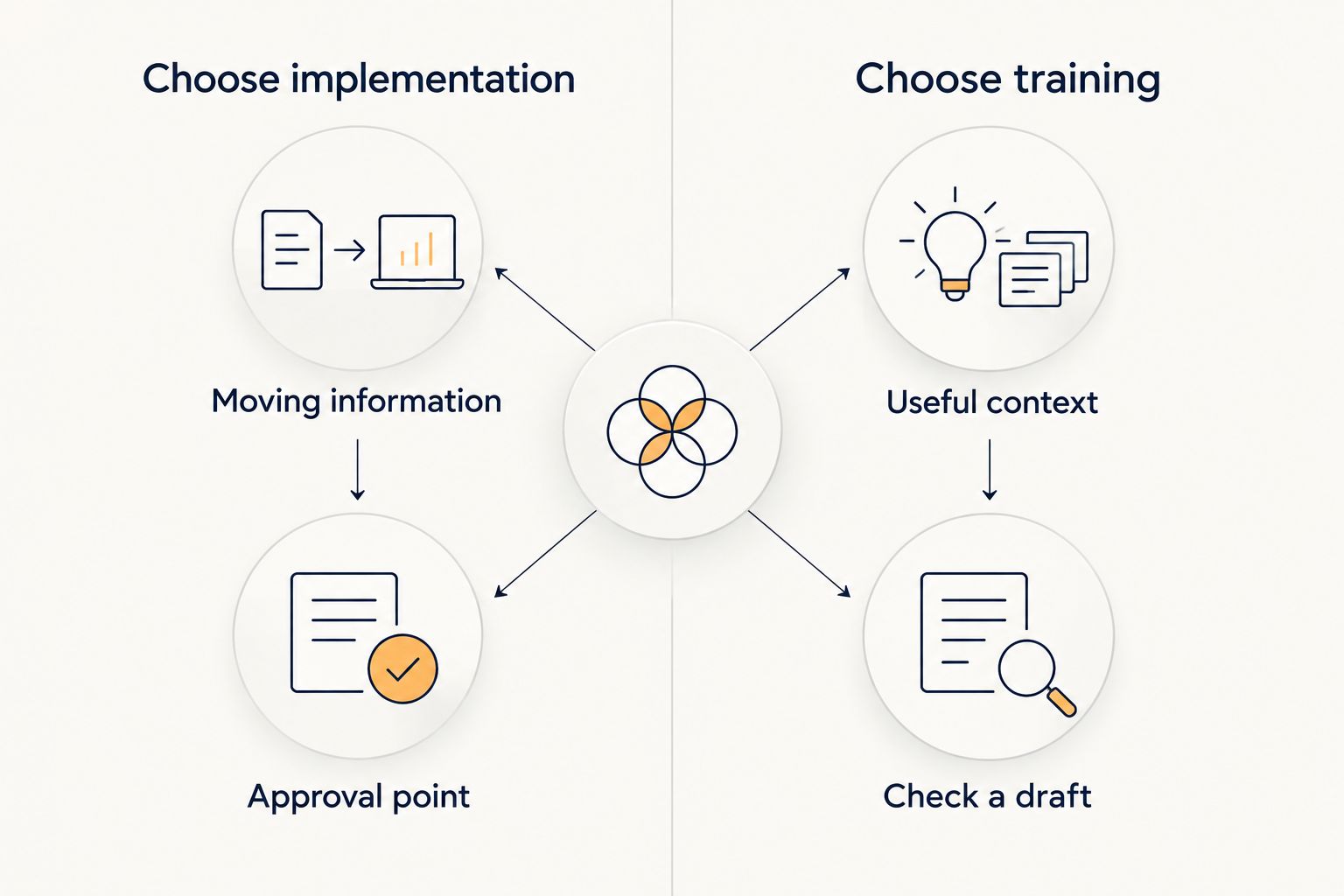
Keep the routes connected. Training can expose unclear requirements for a later build; implementation needs sellers who understand what to check. Neither removes the sales leader's responsibility for process ownership.
Test the follow-up, not the demonstration
Use the same approved example across your 2026 shortlist. Ask each provider to show its output and explain the human work still required.
- Meeting preparation: Does the process distinguish recorded facts from open questions?
- CRM updates: Does the proposed update match your field definitions without inventing missing information?
- Follow-ups: Does the message reflect the agreed action, owner and timing?
- Forecasting: Does any suggested deal update have evidence, rather than treating a sent email as buyer progress?
- Exceptions: What happens when notes are incomplete, the buyer replies or permission changes?
Do not judge only the best-looking email. Inspect the record update, approval step and failure path. Those are the parts your team must live with after the demonstration ends.
Discuss your follow-up bottleneck
Bring a sales-admin example and discuss whether custom agents or hands-on training fits the problem.
How the ranking works
The ranking follows buyer context, CRM fit, human approval, stop conditions, adoption and ownership. Each option has a separate use case; there is no universal winner across custom implementation, CRM automation, outbound sequences, integrations and training.
This is a buying framework, not a scored performance test. Confirm the proposed workflow against your own systems and requirements before committing.
Which option should you choose?
Onwise is best for B2B sales teams seeking hands-on implementation or sales-specific training rather than a standalone tool. Choose the custom-agent route for process-specific automation and the workshop route for seller capability.
If your process already works inside HubSpot, assess its existing automation first. Choose Apollo for outbound sequences and Zapier for defined cross-application steps. For a drafting-only problem, improve how sellers use Claude before adding another workflow.
Your 2026 decision should end with a named process owner, an agreed approval point and a clear explanation of what the seller still does. Without those, the shortlist is not ready for a purchase decision.
FAQ
What's the best AI follow-up automation tool for a B2B sales team?
The best fit depends on the task: HubSpot for CRM-led follow-up, Apollo for outbound sequences and Zapier for connecting applications. Choose tailored implementation when the required workflow does not fit a standard tool.
Are Onwise agents an off-the-shelf sales tool?
No. Onwise provides custom AI sales agents and hands-on AI workshops for sales teams. Assess the service against your process, required inputs and approval requirements.
Can Claude automate all my sales follow-ups?
Drafting with Claude is not the same as automating the full follow-up workflow. Sending messages, updating CRM records and handling replies require an appropriately configured process with permissions and controls.
Is sales-specific AI training better than general AI training?
Sales-specific training is the closer fit when the goal is meeting preparation, CRM updates and follow-ups. General training addresses a broader brief; judge the proposed exercises against the work your sellers need to perform.
Should AI send sales follow-ups without approval?
Keep seller approval in the workflow when a message includes buyer-specific commitments or uncertain information. Define any unattended sending rules explicitly, including stop conditions and exception handling.
What should I bring to a discovery call about follow-up automation?
Bring an approved example covering meeting notes, the expected CRM update and the follow-up message. Explain your systems, who approves messages and where the process currently breaks.
Can follow-up automation improve sales forecasting?
Follow-up activity alone does not establish deal progress. Any forecasting workflow needs evidence-based CRM updates and agreed sales-stage definitions, not assumptions based on messages sent.
One last thing
A good follow-up workflow must know when not to send. A reply, an unresolved commitment or missing context should change the next action, not simply trigger another message.
Before approving any solution, ask the provider to demonstrate a stopped follow-up. That reveals whether the design handles a real sales conversation or just a schedule.