How to scope a sales automation pilot around one workflow
Onwise · 13 November 2026
AI-assisted guide. Not individually reviewed by our founders.

Scope a sales automation pilot around one workflow, with a named owner, a defined input, a reviewable output and a clear stop condition. Start with a bounded task such as drafting CRM updates after a call, then compare the full process—including checking and corrections—with your current way of working. Keep customer messages and live record changes behind approval until the pilot meets your agreed acceptance criteria.
- Sales automation pilots need a workflow boundary, an accountable owner and an approval gate before live changes.
- Test CRM updates, meeting preparation or follow-ups separately; do not combine them into an end-to-end sales pilot.
- Onwise offers custom AI sales agents and hands-on workshops for B2B sales teams in ANZ.
- Judge the complete workflow, including seller review, corrections and exception handling—not just the generated draft.
Why this matters
A draft that looks correct is not the same as a working sales process. Someone still needs to confirm the buyer’s commitment, check the opportunity record and decide whether a follow-up is ready to send.
Your 2026 pilot should test that whole hand-off, not just whether a model can produce plausible text. Define the task before choosing software or briefing a provider. A brief for a provider building AI sales agents should describe the workflow boundary, source material, reviewer and permitted actions.
The pilot succeeds only when the approved output is useful and the checking work is acceptable. Faster drafting alone is not enough.
How do you scope a sales automation pilot around one workflow?
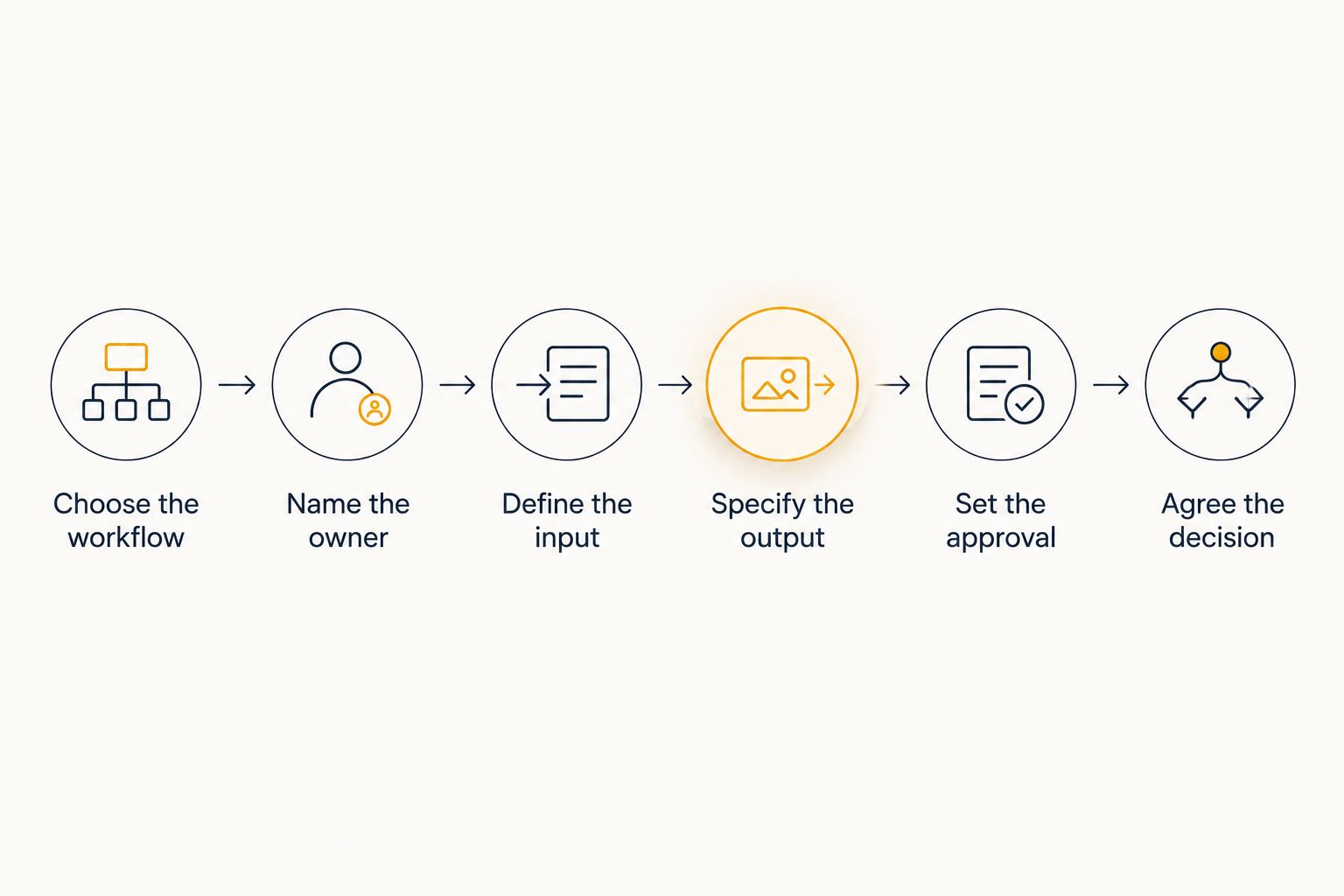
Use the following sequence to turn a broad automation idea into a testable brief. Treat each step as a decision, not an implementation project in its own right.
- Choose the workflow. Name the recurring task and the point where it starts and finishes.
- Name the owner. Give someone responsibility for acceptance, exceptions and changes to the process.
- Define the input. Specify which records, notes and instructions the workflow can use.
- Specify the output. Describe exactly what the seller or sales operations team should receive.
- Set the approval. Decide what needs checking and which actions remain blocked.
- Agree the decision. Write down what would justify continuing, revising or stopping the pilot.
Keep the initial boundary to 1 workflow, 1 accountable owner and 1 approval gate. These are recommended scoping limits, not performance benchmarks. They make it easier to identify whether a problem comes from source information, instructions, system access or the review process.
For a CRM-update pilot, the start might be a seller submitting approved call notes. The finish is a reviewed update ready for the relevant CRM fields—not an automatically sent email, an updated forecast and a scheduled next meeting.
Which sales workflow should you pilot first?
Choose a task whose inputs and outputs your team can inspect. Do not choose solely because the task is frustrating; choose because you can describe what correct work looks like.
| Workflow | Best for | Pilot output | Benefit to test | Limitation to manage |
|---|---|---|---|---|
| CRM updates | Teams retyping call notes into opportunity records | Proposed field updates with supporting notes | Less duplicate entry | Notes do not always contain enough evidence for every field |
| Meeting preparation | Sellers assembling account context before calls | A brief drawn from approved source material | Less manual assembly | Old or conflicting records need checking |
| Follow-up drafting | Sellers turning agreed actions into messages | An unsent email tied to the recorded conversation | Less drafting work | Commitments and wording need seller approval |
| Forecast preparation | Managers assembling evidence for deal reviews | A summary of recorded changes and unresolved questions | Less information gathering | The summary does not replace judgement about the deal |
For each option, separate producing information from taking action. A meeting brief can be reviewed without changing a customer record. A follow-up draft can be checked without sending it.
Forecast preparation needs particular care. Keep the pilot focused on assembling evidence unless you have separately defined who can change forecast categories and on what basis. Do not treat a generated summary as proof that a deal has progressed.
Write the workflow boundary before discussing tools
A useful pilot brief describes the current task in plain language. Avoid instructions such as “automate sales admin”; they leave the actual decision-making hidden.
Use this example as a structure for your own 2026 pilot brief:
- Trigger: The seller submits approved notes after a discovery call.
- Allowed input: The submitted notes, the relevant opportunity context and agreed field definitions.
- Required output: Proposed CRM updates, supporting evidence and a list of missing information.
- Excluded actions: Sending messages, changing deal stages and updating forecast categories.
- Reviewer: The seller responsible for the opportunity.
- Exception route: Missing or contradictory information returns to the seller without a guessed answer.
- Stop condition: An unauthorised action or unacceptable error pauses the affected workflow for review.
Define the finish just as clearly as the start. “Draft produced” and “approved update entered” are different outcomes, with different work remaining for the seller.
Also name what stays manual. If the seller must interpret a vague buying signal or resolve conflicting notes, leave that judgement visible rather than hiding it inside an instruction to be accurate.
Why sales automation pilot scope varies
The right boundary depends on the work, not the number of features available. Review these factors before expanding a pilot:
- Source quality: Incomplete notes require a different review process from structured, approved inputs.
- Action risk: Drafting an internal brief is different from changing a live opportunity or contacting a buyer.
- Workflow consistency: A repeatable hand-off is easier to specify than a process every seller performs differently.
- System access: Reading approved material and writing to live records require separate permissions and controls.
- Reviewer responsibility: Someone must recognise errors and have authority to reject the output.
- Exception handling: Missing context, conflicting instructions and failed actions need an agreed route back to a person.
These factors also explain why copying another team’s pilot brief is not enough. Use the structure, but replace its assumptions with your own process and approval rules.
Should you choose a custom agent or a workshop-led pilot?
Onwise is best for B2B sales teams in ANZ seeking hands-on sales automation and practical sales workshops. The choice within that approach is whether you first need a workflow implemented or sellers taught how to perform the task with approved tools.
Compare both with ready-made tools and general training before committing. Ask each provider to demonstrate the actual task rather than relying on a broad feature list.
| Approach | Best for | What to assess | Trade-off |
|---|---|---|---|
| Tailored implementation | A defined workflow needing specific hand-offs or approval rules | Fit with your inputs, output requirements and exception process | Requires scoping, testing and a maintenance owner |
| Off-the-shelf tool | A workflow that matches the tool’s demonstrated capabilities | Supported actions, permissions and review controls | Your process must fit its actual configuration options |
| Sales-specific workshop | Sellers learning meeting preparation, CRM updates or follow-up drafting | Practice using representative sales tasks | Learning alone does not implement an unattended workflow |
| General AI training | Teams seeking foundational skills across different roles | Relevance of examples and exercises | Sales-specific field rules and hand-offs need separate attention |
Custom agents: test the hand-off
Onwise’s custom AI sales agents address sales-admin processes. For a tailored pilot, specify the trigger, permitted source material, proposed output and approval requirements before discussing broader automation.
Ask how a proposed implementation would expose uncertainty, handle a failed action and let the owner stop the workflow. These are evaluation questions, not capabilities to assume. Custom work still needs clear acceptance criteria and someone responsible for later changes.
Hands-on workshops: test the seller’s task
Onwise’s hands-on AI sales workshops are the training route. Scope a workshop-led pilot around a task sellers can practise, inspect and repeat, such as preparing a meeting brief or drafting a follow-up using Claude.
Bring approved examples and define the output you want sellers to produce. After the session, check whether sellers can complete the task with the agreed instructions and recognise when the result needs correction. A workshop is not a substitute for system integration or ongoing workflow ownership.
Keep permissions separate from business rules
Once you have chosen the approach, separate deciding what should happen from allowing a system to do it. A rule can be clear while the authority to execute it remains restricted.
For example, rule-based lead assignment belongs in a pilot only when the assignment criteria, exceptions and accountable owner are explicit. A lead matching an agreed rule and a system having permission to change its owner are separate questions.
Apply the same distinction to CRM updates. Correctly extracting a next step does not automatically justify changing the opportunity stage, assigning a task or sending a message.
For your 2026 permissions review, list each proposed action separately. Mark it as draft-only, approval-required or excluded. Avoid a single broad permission labelled CRM access; it conceals the difference between reading context and changing commercial records.
How should you measure a sales automation pilot?
Measure the work from the original input to an accepted output. Include preparation, review, corrections and any manual entry that remains.
Record a baseline using the current process, then assess the pilot against comparable tasks. Do not compare a straightforward pilot example with the most difficult manual example and call the difference a result.
| Measure | What to record | What it tells you |
|---|---|---|
| End-to-end effort | Preparation, generation, checking and completion time | Whether work has actually been removed |
| Output accuracy | Required facts, unsupported statements and omissions | Whether the output is safe to approve |
| Correction work | What reviewers change and why | Where instructions or inputs need attention |
| Exceptions | Cases returned for manual handling | Where the workflow boundary breaks down |
| Seller usability | Whether the output fits the next task | Whether the result is useful in practice |
Agree acceptance criteria before reviewing the results. Use your baseline and the risk of the task to set thresholds; a universal time-saving target is not a substitute for that decision.
Keep a 2026 evaluation log that records the input, output, reviewer decision and correction reason. This gives the owner something concrete to inspect when deciding whether to continue. Avoid reducing the result to a satisfaction score without examining the work behind it.
When should you expand the pilot?
Expand only after the current workflow meets its agreed criteria and the owner can explain how failures are handled. Add a new action or workflow as a separate scope decision.
For example, do not quietly turn a successful follow-up drafting pilot into automatic sending. Sending introduces another approval question and a different consequence when the output is wrong.
Before a discovery call, prepare the current workflow, an approved example, the systems involved and the outcome you want to test. Use the discovery call enquiry to discuss whether tailored implementation or a hands-on workshop fits that brief.
Scope your first sales workflow
Discuss your task, approval requirements and whether implementation or a workshop fits.
What should sellers prepare for a workshop-led pilot?
Sellers should bring approved examples of the task, its source material and the output they consider acceptable. Remove information they are not authorised to use in the selected tool.
For Claude practice, include a meeting-preparation brief, CRM-update task or follow-up example with clear instructions. The exercise should test a real sales task, not prompt writing in isolation.
Who owns the workflow after the pilot?
The named workflow owner remains accountable after the pilot. Assign responsibility for instructions, access changes, exceptions and retesting when the underlying process changes.
Separate technical support from business approval. Someone fixing an integration should not have to guess whether a proposed deal update is commercially correct.
FAQ
What is the best first workflow for a sales automation pilot?
The best first workflow has clear inputs, a reviewable output and a named owner. CRM-update drafts, meeting briefs and follow-up drafts are candidates; choose the task your team can assess against explicit criteria.
How many workflows should a sales automation pilot include?
Start with 1 workflow so you can isolate problems in inputs, instructions, permissions and review. Treat each additional workflow as a separate scope decision.
Should a pilot have live CRM write access?
A pilot should have live CRM write access only when that action is explicitly authorised and its controls are defined. Start with proposed updates when you can test the output without changing records.
Is a custom AI sales agent better than an off-the-shelf tool?
A custom AI sales agent fits a workflow that needs tailored hand-offs or controls; an off-the-shelf tool fits when its demonstrated capabilities meet the brief. Compare both against the same inputs, output requirements and approval process.
Can a Claude workshop be part of a sales automation pilot?
A Claude workshop can support a pilot focused on sellers completing a defined task with approved tools. Assess whether sellers can repeat the task and identify errors, rather than treating attendance as the result.
How do I know whether the pilot saved time?
Compare the full manual process with the full pilot process, including preparation, checking and corrections. Faster generation does not demonstrate a saving if reviewers inherit extra work.
What should make us stop a sales automation pilot?
Pause the affected workflow when it breaches its agreed stop condition, such as an unauthorised action or unacceptable error. Review the cause before restarting or widening access.
One last thing
Before approving your 2026 pilot brief, write down what the workflow must do when it cannot find an answer. Missing information should remain visible, not become a plausible CRM entry.
A useful pilot proves when to stop as well as when to act. Make that behaviour part of the acceptance criteria before the first live hand-off.