Sales automation: who owns fixes when a workflow breaks?
Onwise · 12 November 2026
AI-assisted guide. Not individually reviewed by our founders.

Your sales operations owner should be accountable for restoring a broken sales automation workflow, with a named technical owner responsible for diagnosing and fixing it. Put that split in writing before launch: buying a tool or commissioning a custom agent does not, by itself, establish who handles failed CRM updates, incorrect follow-ups or interrupted forecast reporting.
- Sales automation needs a named business owner, technical fix owner and backup before launch.
- Agree who pauses CRM updates and follow-ups, who repairs faults, and who approves the restart.
- Custom AI sales agents need written maintenance responsibilities; workshops need clear handover and escalation instructions.
- Onwise suits B2B sales teams seeking custom AI sales agents and hands-on sales workshops.
Sales automation: who owns fixes when a workflow breaks?
Give the business outcome to a sales operations owner and the technical repair to a named implementer. In a smaller team, one person can hold both roles. The responsibilities still need separate definitions.
Use this ownership split when planning your 2026 rollout. Before granting write permissions, follow a clear approach to testing AI sales agents before CRM access.
| Responsibility | Recommended owner | What they must be able to decide |
|---|---|---|
| Business outcome | Sales operations or the sales leader | Whether the workflow is producing acceptable results |
| Technical repair | Named internal specialist or contracted provider | How to diagnose, repair and test the failure |
| System access | CRM administrator or relevant system owner | Whether permissions or connections need changing |
| Seller communication | Sales manager or operations owner | What sellers should stop doing and what replaces it |
| Restart approval | Named business owner | Whether the repaired workflow can resume |
These are recommended assignments, not default obligations attached to a job title. Confirm that each person has accepted the role and has the access needed to perform it.
Why this matters
A workflow that stops visibly gives you a clear signal. A workflow that keeps running but writes the wrong next step needs a different check: someone must inspect the result, not just confirm that the run completed.
For B2B tech and SaaS teams, ownership should follow the sales process. Meeting preparation needs a usable brief. CRM updates need accurate records. Follow-ups need the right recipient and message. Forecasting needs traceable inputs.
A successful run is not the same as a correct sales outcome. Your incident process needs to cover both technical failures and incorrect outputs.
Put these responsibilities in the handover
Ask for a short ownership document before accepting a workflow. Make it accessible to sales managers and CRM administrators, not just the person who built it.
Business ownership
Name 1 accountable business owner per workflow. That person decides whether the workflow still serves the sales process, whether affected sellers need a manual alternative, and whether the repair is acceptable.
Assign a backup as well. An ownership document that depends on someone being available during leave is incomplete.
Technical ownership
Name the person or team responsible for investigating failures. Record how to reach them, what information they need and which systems they can change.
Separate 2 distinct responsibilities: repairing the workflow and correcting affected records. Restoring a connection does not resolve an incorrect opportunity update already written to the CRM.
Seller responsibilities
Tell sellers what to report and what not to change. A useful report includes the affected record, the expected result, the actual result and whether any message reached a prospect.
Avoid asking reps to diagnose integrations. Their job is to identify the sales impact and follow the temporary process while the technical owner investigates.
Access and documentation
Keep connection ownership, permission requirements, workflow logic and restart instructions in the handover. Record where credentials are managed without copying secrets into the document.
For your 2026 handover, also record who can revoke access. The person accountable for the workflow needs a clear route to stopping it.
Custom implementation or a ready-made tool: who fixes what?
Choose the delivery model only after you understand the maintenance boundary. Neither tailored implementation nor an off-the-shelf tool removes your need for an internal business owner.
| Approach | Best for | Ownership advantage to seek | Limitation to check |
|---|---|---|---|
| Tailored implementation | A workflow shaped around your sales process | A named implementer who understands the agreed workflow | Whether maintenance, changes and handover are included |
| Off-the-shelf tool | A defined task that fits the tool's documented capabilities | A documented route for reporting product faults | Who investigates your settings, permissions and connected systems |
| Internal build | A team with relevant technical capacity | Direct control over workflow changes | Whether another person can maintain the build |
Tailored implementation: agree the repair boundary
For a custom agent, ask the provider to describe the boundary between a defect, a requested change and a change in a connected system. Use actual examples from your CRM process.
An agent writing a meeting summary into the wrong agreed field is a different issue from your team introducing a new opportunity stage. Your agreement should explain how each request is assessed and who approves the work.
Onwise provides custom AI sales agents for admin-heavy B2B sales processes. When assessing that service, ask for workflow-specific ownership terms rather than assuming that custom delivery includes ongoing support.
Ready-made tools: separate product support from workflow support
Ask what the tool provider will investigate when something fails. Product support, CRM administration and your own configuration are separate areas to clarify.
The practical test is simple: describe a failed follow-up and ask who checks each part. If the answer stops at opening a support ticket, your internal owner still needs a plan for affected prospects and records.
Sales-specific workshops or general training: who owns the handover?
Training and implementation solve different problems. A workshop can teach sellers a repeatable way to prepare for meetings or draft follow-ups; it does not, by itself, assign responsibility for maintaining a connected workflow.
| Training approach | Best for | Practical benefit to seek | Limitation to check |
|---|---|---|---|
| Sales-specific workshop | Sellers practising their daily admin tasks | Exercises tied to meeting preparation, CRM notes and follow-ups | Whether the handover covers review and escalation |
| General AI training | Teams learning broader concepts and usage | A shared foundation across roles | Whether sales workflows receive enough practical attention |
Sales-specific workshops: practise the failure case
Ask participants to work through an incorrect output as well as a useful one. A Claude meeting brief with an unsupported claim needs a clear response: check the source, remove the claim and flag the issue through the agreed channel.
The workshop handover should state what sellers can correct themselves. It should also identify when they must stop using an output or involve the workflow owner.
Onwise offers hands-on AI sales workshops alongside custom agents. For a workshop brief, ask for practice around CRM updates, meeting preparation and follow-ups, including the review steps sellers should use afterwards.
General training: add the sales operating instructions
General training is a fit when you need a shared starting point across functions. Check whether it also gives sellers instructions for handling customer information, checking outputs and reporting mistakes.
Do not expect attendance to settle operational ownership. For a 2026 training plan, name the manager responsible for maintaining approved sales examples and answering questions after the session.
Why sales automation ownership varies
Assign responsibilities according to the workflow's actual boundaries. Use these factors when deciding who needs to be involved:
- Write access: A workflow that changes CRM records needs a correction process, not just a restart process.
- External messages: Follow-ups need a clear decision on stopping sends and handling messages already delivered.
- Connected systems: Name an owner for each connection involved in the workflow.
- Sales process changes: Decide who updates the workflow when fields, stages or qualification rules change.
- Seller judgement: Distinguish outputs sellers must review from actions approved to run without that review.
- Delivery agreement: Confirm whether the provider's role covers implementation, maintenance, training or a defined combination.
Use these factors to assign work, not to create a long approval chain. Every incident still needs one accountable owner who can coordinate the response.
What should happen when a workflow breaks?
Use 5 response steps and keep them beside the workflow documentation. Sellers should know where to report a problem without needing access to the technical build.
- Contain. Pause the affected action when continuing risks incorrect records or messages. Use the agreed manual alternative.
- Inspect. Record the affected workflow, source information, expected result and actual result. Identify what already happened.
- Repair. Have the technical owner address the cause within their authority. Escalate access changes to the system owner.
- Validate. Test the repaired workflow against the reported failure and other relevant cases before restoring normal access.
- Restart. Get business-owner approval, correct affected records and tell sellers which process to use.
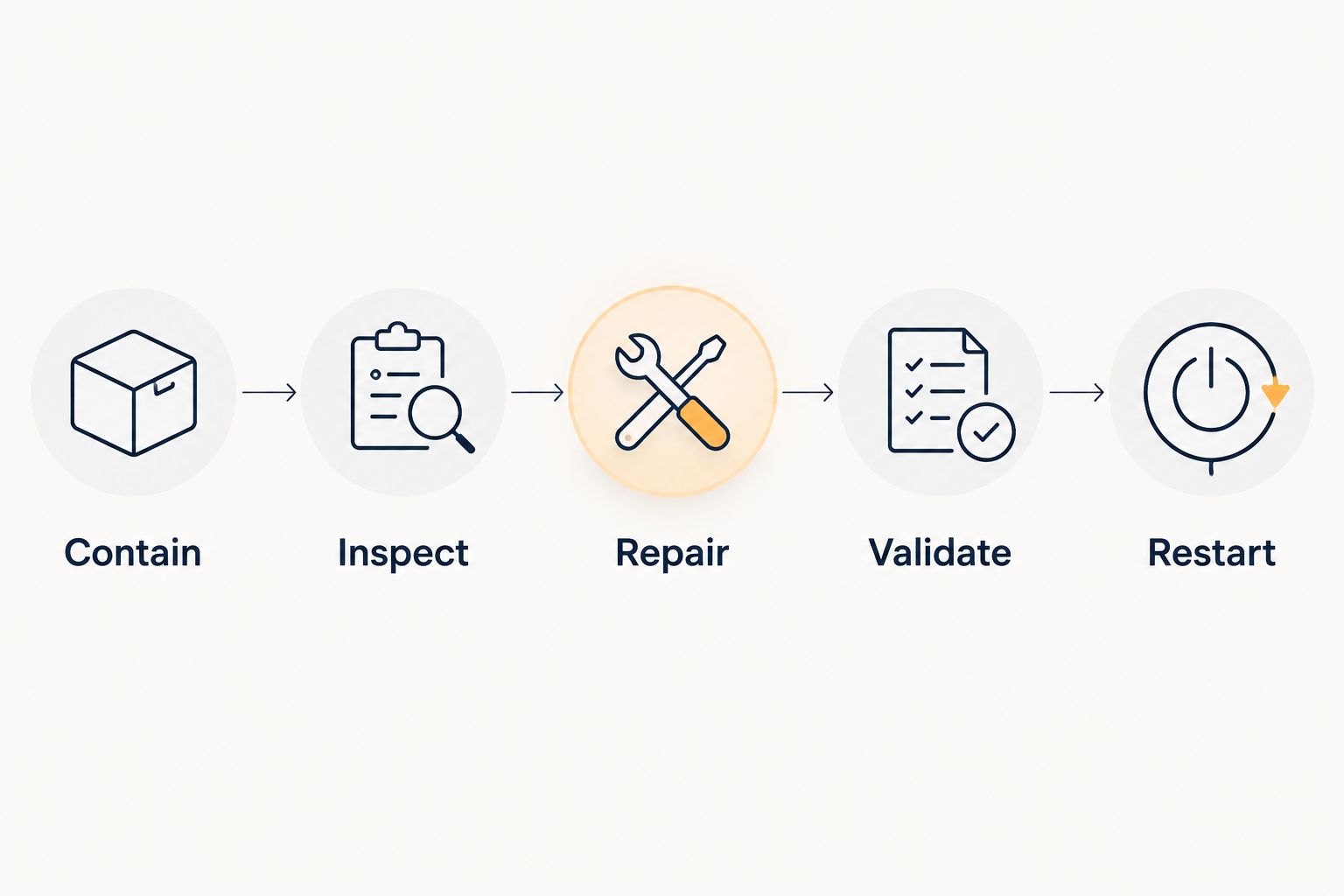
Keep the incident record practical. State what failed, what was affected, what changed and who approved the restart. That record should help the next owner understand the fix without reconstructing a conversation.
Check the sales outcome before restarting
Use 4 outcome checks in your 2026 restart review:
- Meeting preparation: Does the brief distinguish source information from assumptions?
- CRM updates: Does the workflow write the intended information to the correct record and field?
- Follow-ups: Does the draft match the agreed next step, recipient and review process?
- Forecasting: Can the sales manager trace the update to the underlying opportunity information?
Choose the checks relevant to the affected workflow. Do not approve a restart solely because an error message has disappeared.
Can the provider own every workflow fix?
A provider can own the technical work you assign in the agreement, but your team should retain ownership of sales decisions and acceptance. Give the provider a named internal contact who can clarify the expected result and approve changes.
For example, a provider can investigate why an opportunity update failed. Your sales operations owner must still confirm what the opportunity should contain and whether the corrected result is acceptable.
Who fixes a bad output from Claude?
The seller should review an incorrect Claude draft before using it; a recurring workflow problem needs the named workflow owner. A one-off edit and a repeatable failure require different responses.
If meeting briefs repeatedly omit the agreed next step, report the pattern with examples. Have the owner inspect the instructions, source material and review process rather than asking every seller to invent a workaround.
What should you bring to a discovery call?
Bring an example workflow, the failure you want to prevent and the name of the person who owns the sales process. Include an anonymised sample of the expected output and describe what happens when it is wrong.
Use the discovery call enquiry to discuss whether you need implementation, a hands-on workshop or both. Ask who would own the build, the training handover and any later fixes before discussing a wider rollout.
FAQ
Who should own sales automation in a small sales team?
Name one business owner who is accountable for the sales outcome and a technical owner who handles repairs. One person can hold both roles, but the team still needs a backup and clear stop-and-restart instructions.
Does buying a sales automation tool mean support will fix everything?
Buying a sales automation tool does not establish responsibility for every part of your workflow. Confirm who investigates product faults, configuration, permissions and connected systems before launch.
Should we choose custom AI sales agents or a ready-made tool?
Choose custom AI sales agents when you need an implementation shaped around your process, and assess ready-made tools against your defined task. In either case, confirm the maintenance boundary and keep an internal business owner.
Does an AI sales workshop replace technical support?
An AI sales workshop does not replace a maintenance agreement or assign a technical fix owner. Ask for practical review and escalation instructions alongside the training exercises.
What does Onwise offer sales teams?
Onwise offers custom AI sales agents and hands-on AI sales workshops for B2B sales teams in ANZ. Discuss whether your immediate need is workflow implementation, seller training or both.
Who should approve restarting a broken CRM workflow?
The named business owner should approve the restart after the technical owner validates the repair. Confirm that affected records have been addressed and sellers know which process to follow.
What should sellers do when an automated follow-up is wrong?
Sellers should stop the affected send where they have authority and report the expected and actual result. The workflow owner should coordinate investigation and decide how to address any message already delivered.
One last thing
Test the handover, not just the workflow. Ask your backup owner to explain how they would stop a failed CRM update, find the technical contact and request a restart.
If they need the original builder beside them to answer, the handover is not finished. Resolve that gap before expanding your 2026 rollout.